I found a fun hack for creating consistent backgrounds for dialogue scenes. I realized that Seedance is actually really good at this, but the cost per generation is much more than others, like WAN and MiniMax H3. So I decided to use the strength of each: Seedance for filming the master shot and coverage, then H3 for low cost dialogue generation. (Full video below.)
Here is the diagram I got for the camera positions using Claude Design. I’m not sure if it’s totally necessary but if you’re having trouble, give it a shot.
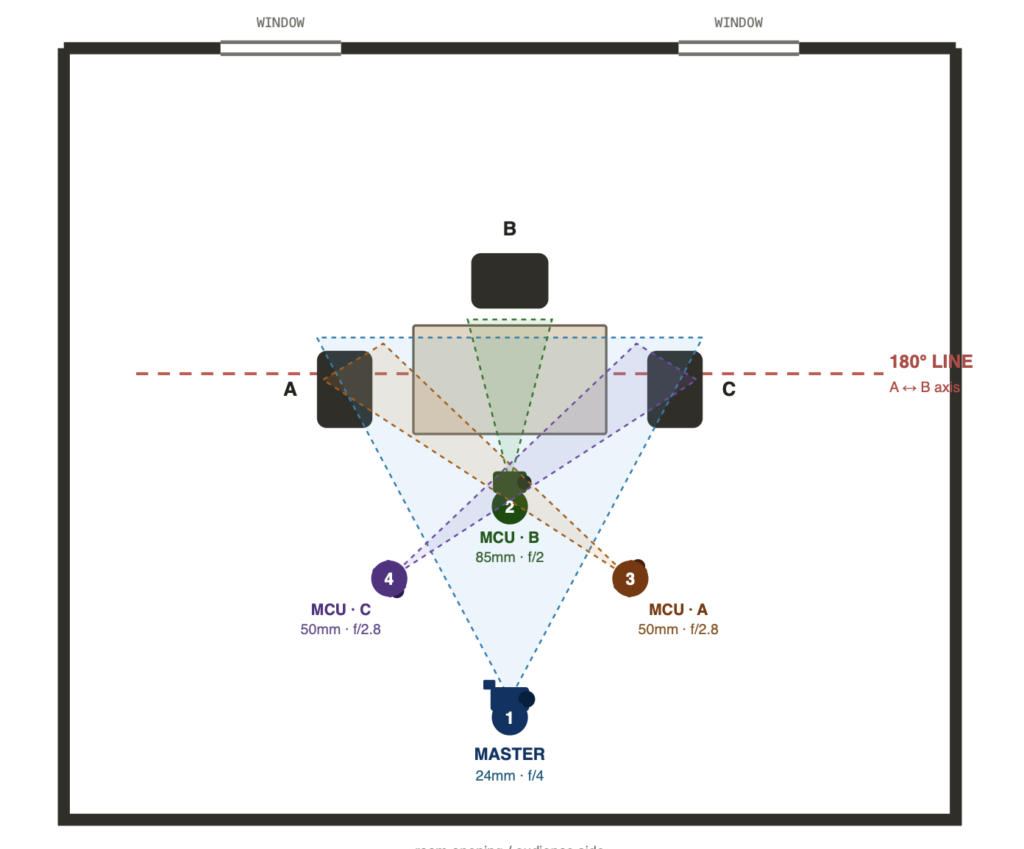
This is the instruction I gave Claude Design:
place diagram images with camera and lens specifications on the diagram for this dialogue scene: opening master shot, medium close ups for each seated character. do not "cross the line". Follow "the 180 rule" in film. Here is the prompt I used in Seedance. The brackets mean I used a reference image.
Asset bindings: [location] = the room (environment reference — architecture, furniture, light quality, color palette).

[Hacker] = Character A "the hacker," red hair with shaved side, black hoodie, sleeve tattoos — she sits in the LEFT chair.

[Mike] = Character B "Mike," short brown hair, clear round glasses, plain black tee — he sits in the CENTER chair at the head of the table, facing camera.

[Mechanic] = Character C "the mechanic," older man, grey beard, denim overalls over a pale tee — he sits in the RIGHT chair. Match each face, hair, and wardrobe strictly to its reference sheet.

Scene Summary: Three people sit at a long table in the room from [location], listening in complete silence while a four-camera coverage plan cuts from a wide master into three medium close-ups; live-action cinematic realism, no one speaks. Fixed rules for the whole video: the camera never crosses the 180-degree line — all four setups sit on the same side of the table. Character A stays screen-left, Character B stays center, Character C stays screen-right in every shot. No talking, no lip movement. All three listen attentively to an unseen point off-frame beyond the far end of the table. Performance is carried entirely by eyes, breathing, small head tilts, and micro-expressions.

0s-5s: SHOT 1 — MASTER. Wide establishing shot, 24mm, f/4, camera low and centered at the open end of the room, locked off with a barely perceptible handheld breath. The full table, all three characters, and the room from [location] are visible. A sits screen-left in profile-three-quarter, B sits center facing camera, C sits screen-right. All three are still and quiet. A slowly closes and reopens her eyes. C shifts his weight once in the chair. B does not move. Papers and a bottle rest on the table. Dust drifts through the window light.

5s-8s: SHOT 2 — MCU B. Straight cut to a medium close-up of [Mike], 85mm, f/2, dead-on eyeline, very shallow depth of field, background falling soft. He faces the lens directly, jaw set, lips closed. His eyes flick once to screen-left and settle back. He inhales through his nose and gives a single small nod of understanding. No speech.

8s-11s: SHOT 3 — MCU A. Straight cut to a medium close-up of [Hacker] 50mm, f/2.8, shot from the far right side of the coverage, favoring her face as she looks screen-right toward the others. Her expression is guarded and intent, brows slightly drawn. She blinks slowly, tongue pressed behind a closed mouth, then narrows her eyes a fraction. Silent.

11s-15s: SHOT 4 — MCU C. Straight cut to a mirrored medium close-up of [Mechanic], 50mm, f/2.8, shot from the far left side of the coverage, symmetrical to the previous setup. He looks screen-left toward the others, weathered and patient. He scratches his beard once, exhales, and his mouth stays closed. The shot holds on his listening face as the video ends.
I mention a method for adding a voice reference to get consistent voices for dialogue scenes. Watch that tutorial here: